Remote Control for All TV
- 3.7
- Rating
- 10.00M
- Installs
- Free
- Price

 Analysis by App-foxy
I installed Remote Control for All TV to see whether it could genuinely replace the collection of remotes around my home, rather than simply look convenient in a store listing. It is a free House & Home app from ZipoApps, designed to turn a compatible phone into a television remote. The idea is immediately appealing: one familiar screen for changing channels, adjusting volume, navigating menus, and handling basic playback instead of searching between sofa cushions.
My overall impression is practical but conditional. When the phone and television communicate properly, the app can be a handy backup and a useful everyday controller. It is especially attractive if several people in the house keep misplacing the original remote. However, a phone remote is not automatically a universal replacement. Compatibility, connection method, and the convenience of using a touchscreen matter more than the promise of having “all TV” control in one place.
How the app feels in current everyday use
The first thing I noticed is that the app makes sense as a quick-access tool rather than a complete home-entertainment command center. I can imagine opening it when the television remote is missing, when its batteries have died, or when I want to control the screen without getting up. The phone is already nearby, so the practical advantage is less about adding a new device and more about making an existing one useful.
You May Also Like

 AccuWeather: Weather Radar
AccuWeather Review: A Quick, Clear Forecast for Everyday Decisions
For everyday plans, the best forecast is the one you can understand quickly. AccuWeather makes rain timing, radar, and local conditions easy to act on, with a few trade-offs.

 Hill Climb Racing
Why Hill Climb Racing Still Turns Crashes Into One More Run
A tiny car, a bumpy hill and one more upgrade: Hill Climb Racing keeps resurfacing because its simple chaos makes every near-miss feel personal.

 AliExpress - Shopping App
AliExpress Makes Global Shopping Feel Personal, but Shoppers Bear the Risk
AliExpress turns a global marketplace into a pocket-sized discovery engine. Its reach is useful, its shopping loop compelling, and its trade-offs easy to miss.

 Lords Mobile: Kingdom Wars
Lords Mobile Is a Kingdom-Building Routine, Not a Quick Match
A case-by-case verdict on the building, battles, device demands, and social commitments that make Lords Mobile rewarding for some players and exhausting for others.

 PDF Scanner app - TapScanner
TapScanner Makes Paperwork Easier to Capture, Check, and Share
TapScanner makes scanning with a phone feel less like a rescue operation and more like a dependable step in getting work done. Its capture tools are useful, though not flawless.

 Block Blast!
Block Blast! Shows How Much a Puzzle Game Can Leave Out
A quiet grid game shows why puzzle players increasingly value instant clarity, repeatable skill and low-pressure play—and where the genre still needs to catch up.
More From Our News Desk
View All News


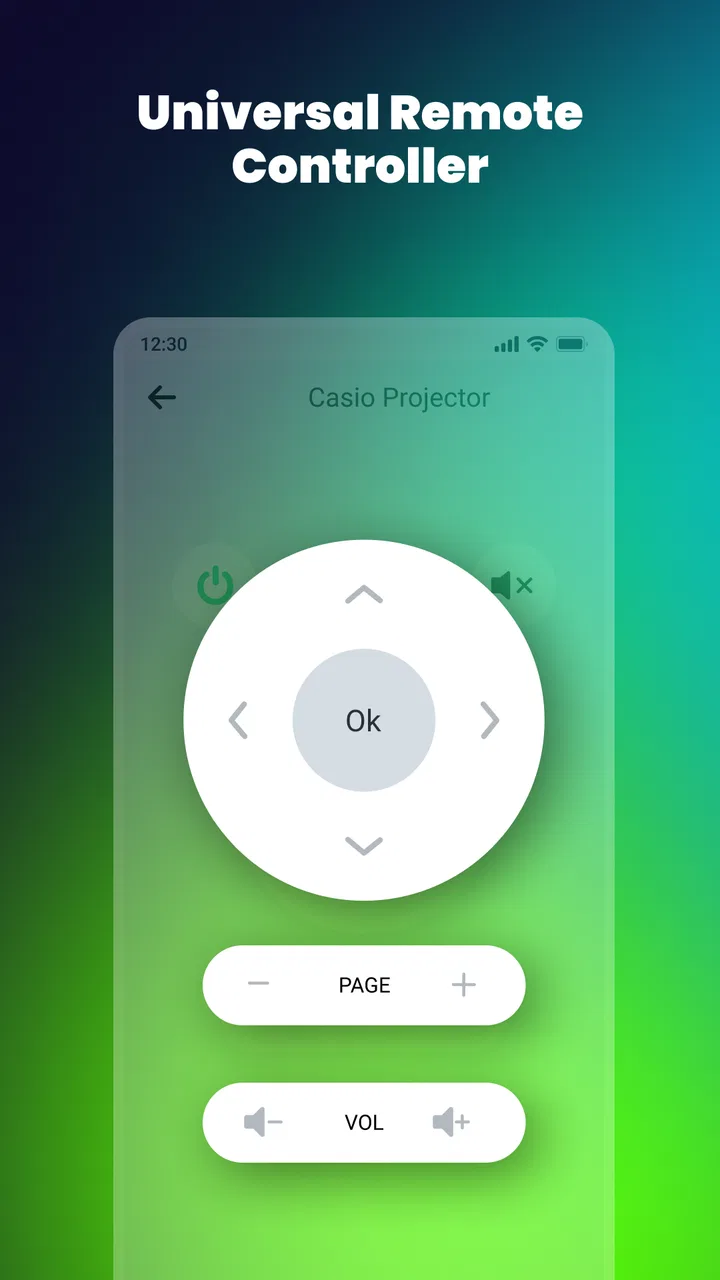
The interface follows the familiar logic of a physical remote. Buttons for common actions are easier to understand than a complicated dashboard, and that matters when I am trying to lower the volume during a film or switch input while another person is waiting. A touchscreen also gives the experience a small advantage in one situation: I can keep the remote on my phone instead of carrying a separate accessory from room to room.
That convenience has a clear trade-off. A physical remote gives me raised buttons that I can locate by touch. With a phone, I need to look down more often, unlock or wake the device, and make sure I am pressing the intended control. For simple volume changes this is not a major problem, but navigating a television menu can feel slower when I cannot rely on muscle memory.
The app is free to install, which makes testing it low-risk. It carries an Everyone content rating, so it is presented as suitable for a broad household audience. I would still treat it as a utility to try with my own television rather than assuming that the word “universal” guarantees identical behavior on every model or setup.
The setup question that matters most
Before depending on it, I would check whether the phone can communicate with the television in the way the app expects. Some phone-based remotes rely on infrared hardware, while others work through a shared wireless network or television-specific connection. Those approaches are not interchangeable. A phone without the necessary hardware cannot behave like a traditional infrared handset simply because an app is installed.
This is the most important practical test: install the app, select the relevant television option, and try the basic controls before putting the original remote away. I would test power, volume, navigation, input, and any playback controls I use regularly. If only a few buttons respond, the app may still be useful as an emergency controller, but it should not be treated as a full replacement.
Network-based control brings another everyday consideration. If the phone and television need to be on the same home network, a guest network, extender, or separated wireless band may prevent discovery even when both devices appear to be online. In that situation, repeatedly tapping controls will not solve the underlying connection problem. Checking the network arrangement is more useful than reinstalling the app several times.
Infrared control has a different limitation: the phone needs to be aimed toward the television, much like the original remote. That can be perfectly fine from the sofa, but less convenient when the television is behind furniture or in another room. I would decide whether this app is suitable based on the actual position of my television, not just the phone model.
What the latest listed version suggests
The current version is 5.4.7, while the app has been available since April 8, 2020. That history tells me this is an established utility rather than a brand-new experiment. It has had time to remain available across changing Android devices and television habits, although longevity alone does not prove that every current television will work equally well.
I would be careful not to read a version number as a promise of a particular new feature. What matters to me is whether the present build connects reliably and keeps the controls usable on my phone. The meaningful evolution of a remote app is often quiet: better device recognition, fewer connection failures, clearer onboarding, and compatibility with newer phones. Those improvements are valuable even when they are not immediately visible as a dramatic redesign.
For an existing user, updating to the current build is sensible before diagnosing a connection issue. An older installation may behave differently from the version available today, particularly after a phone operating-system update or a change to the home network. I would also avoid judging the app from a single failed attempt made while the television is off, disconnected, or using a different network path.
The app has passed the scale test in the sense that it has more than ten million installs and an average rating of 3.8 from roughly forty-seven thousand ratings. Those figures make it popular enough to be worth trying, but the rating also supports a balanced expectation: many people find a use for it, while the experience is not universally smooth. I would see that combination as a reason to test compatibility early, not as a reason to reject it outright.
Where it fits into a real household routine
A realistic example is a family watching television after dinner. The original remote has slipped between cushions, one person is using the phone, and nobody wants to pause the evening to search the entire room. I can open the app, try the television profile, lower the volume, and continue watching. In that moment, the app earns its place even if I only use it once a week.
Another useful situation is a guest room or spare television whose remote is rarely used. Rather than buying a replacement immediately, I can keep a phone-based option available for basic controls. This is particularly practical for someone who already carries a phone and does not want another small device to maintain.
I also see value for households with multiple televisions, but only if the app makes switching between them straightforward. The benefit is not merely having buttons; it is avoiding the wrong remote at the wrong screen. I would label each television clearly during setup and test each one separately. That small organizational step can prevent the frustrating experience of sending commands to the living-room television while sitting in front of the bedroom screen.
For older relatives or children, the answer is less obvious. A phone screen can be easier to enlarge and keep nearby, but it can also introduce accidental taps, lock-screen interruptions, and confusion about leaving the remote interface. A physical remote with large, tactile buttons may remain the better choice for someone who does not want to manage a phone at the same time.
Small habits that make the experience better
My first tip is to keep the original remote accessible during the initial trial. Do not wait until a match is starting to discover that the app can change volume but cannot wake the television. Test the controls in a calm moment, then decide whether it is dependable enough for regular use.
My second tip is to treat the phone as a remote, not as a multitasking screen. If I am replying to messages, watching a video, or receiving frequent notifications, the controller becomes less convenient. For longer viewing sessions, I would keep the app open and the phone charged, especially because a remote app is not useful if the device goes into a low-battery state.
A third useful workflow is to make the app an emergency fallback rather than removing every physical option. That gives me the convenience of phone control without creating a single point of failure. If the television needs a pairing step, the network changes, or the phone is unavailable, the original remote remains ready.
I would also test the app from the seating position where I normally watch television. A control that works only when I stand close to the screen may be technically functional but practically poor. This simple test reveals whether aiming, distance, furniture, or network coverage affects the experience in my home.
Costs, limitations, and the alternatives
The app itself is free, but it includes in-app purchases ranging from $0.99 to $99.99 per item. That wide range makes it important to pay attention to what is offered inside the app before accepting a purchase. I would begin with the free experience and decide whether it already covers the controls I need. For a basic backup remote, paying a substantial amount would not make sense to me unless the added value were clear and the app worked consistently with my television.
The average rating of 3.8 also reflects the central weakness of this category: a remote app can be excellent on one phone-and-television combination and disappointing on another. Connection failures, incomplete button support, or an awkward touchscreen layout can outweigh the convenience. I would not assume that a positive experience reported by a friend will transfer directly to my setup.
Compared with the manufacturer’s official television app, this option may be more appealing when I want a general-purpose controller rather than an app tied to one brand. The official alternative may offer deeper functions for its own television family, while a broad remote utility can be quicker to try across different screens. If I mainly use one smart television and need advanced settings, voice features, account access, or content browsing, the official app may be the better fit.
Compared with a universal physical remote, this app costs less to try and avoids another piece of hardware. The physical option wins on tactile feedback, predictable battery behavior, and independence from the phone. It may also be preferable for guests, children, or anyone who wants to operate the television without unlocking a personal device.
Compared with the television’s own buttons, the app is more comfortable for normal viewing because I do not need to walk to the screen. Yet the built-in controls remain a valuable fallback when pairing fails. I would keep that distinction in mind: the app improves convenience, but it does not remove the need to understand how the television can be controlled without it.
Who should use it and who should skip it
I would recommend trying this app if I regularly lose the remote, manage more than one television, or want an inexpensive backup before buying replacement hardware. It is also a reasonable experiment for someone whose phone is always nearby and who mainly needs straightforward controls such as power, volume, channel changes, and navigation.
I would be more cautious if I expect every television feature to appear exactly as it does on the original handset. Specialized buttons, brand-specific menus, and smart-TV functions can be more difficult to reproduce in a general remote app. Anyone who relies heavily on advanced television settings should test those functions rather than assuming that the basic controls represent the whole experience.
I would skip it as a primary solution if my phone lacks the required control method, my television sits outside reliable network coverage, or I dislike looking at a screen while watching television. In those cases, a physical universal remote or the television maker’s own controller is likely to be less frustrating. The same applies to shared households where several people need immediate access and nobody wants the remote tied to one person’s phone.
Privacy and distraction are also practical considerations in a broader sense. A physical remote is purpose-built and does not compete with calls, messages, battery warnings, or other phone activity. If I want the simplest possible viewing routine, adding an app may feel like solving one small problem by introducing another device-management step.
What I would watch in future updates
For future versions, I would pay attention to improvements that affect reliability rather than cosmetic changes. Better device discovery, clearer explanations when a television cannot be reached, and more dependable handling of different home-network arrangements would make the biggest difference in daily use. A remote should tell me why it is not working instead of leaving me to guess.
I would also look for a smoother way to manage several televisions without making the interface crowded. Clear profiles, quick switching, and dependable retention of the selected device would turn the app from an emergency tool into something I could use every day. At the same time, the interface should remain simple enough for a guest to understand without a tutorial.
Another area worth watching is the balance between the free experience and in-app purchases. The app’s usefulness depends on whether the core controls remain accessible and whether optional features feel genuinely optional. I would judge future changes by how transparent that boundary is, especially for people who only need a basic remote.
My final view is that Remote Control for All TV is worth a careful trial, not blind reliance. ZipoApps has built a convenient answer to a familiar household annoyance, and the app’s broad availability makes it easy to test without an upfront purchase. The strongest use case is a phone-based backup that works reliably with a specific television in a specific room.
The best reason to install it is convenience with a safety net. Keep the original remote nearby, test every important button, and pay attention to how the phone connects to the television. If those checks go well, this free House & Home utility can remove a surprising amount of everyday friction. If they do not, a physical universal remote or an official television app will probably serve you better. With its 3.8 average and current 5.4.7 release, Remote Control for All TV feels like a useful option for the right setup, but not a guaranteed replacement for every television remote.
FAQs for Remote Control for All TV
01What types of TVs are compatible with the Remote Control for All TV app?
The Remote Control for All TV app is designed to be compatible with a wide range of TV brands and models. It supports popular brands such as Samsung, LG, Sony, Panasonic, and many more. To ensure compatibility, check the app's compatibility list or test it with your specific TV model.
02Is an internet connection required to use the Remote Control for All TV app?
No, an internet connection is not required for the basic remote control functionality. The app uses infrared (IR) blasters on your smartphone to communicate with your TV. However, some advanced features, like accessing streaming platforms or smart TV functions, may require an internet connection.
03Does the Remote Control for All TV app support smart TVs?
Yes, the app supports smart TVs. It allows users to control smart functions such as launching apps, adjusting settings, and navigating menus. For enhanced functionality, ensure your phone and TV are connected to the same Wi-Fi network to access additional smart features.
04Are there any in-app purchases or ads in the Remote Control for All TV app?
The app is free to download and offers basic remote control features without any cost. However, it may include ads and offer in-app purchases for unlocking premium features, removing advertisements, or accessing advanced functionalities. Users can choose to upgrade for a more seamless experience.
05How can I troubleshoot if the Remote Control for All TV app is not working?
If the app isn't working, first ensure your phone's IR blaster is functioning. Check compatibility with your TV model and ensure there's no obstruction between your phone and TV. Restart the app or your device if needed. Consult the app's support section for further assistance or troubleshooting tips.
Pros
- Easy setup with most TV brands.
- User-friendly interface design.
- Supports multiple device connections.
- Customizable remote layout.
- Quick response time on commands.
Cons
- Ads can be intrusive at times.
- Limited functionality on older TVs.
- Requires stable Wi-Fi connection.
- Some features locked behind paywall.
- Occasional lag in button response.

Remote Control for All TV
Gallery